Lists here, Lists there, Lists, Lists, everywhere

I am a big list-maker.  I am also a big paper girl. I love the tactile sensation of writing things down… and then the satisfaction I get from crossing things off the list.  Whether it is groceries, gift lists, to-do’s, packing lists, whatever. I have a list for it. (surely I’m not the only one?)

Here are some of my lists:

IMGP1689_edited-1
 

The obligatory “HONEY-DO” list, the planned dinner choices for the next week, and the grocery list – notice that someone wrote an address on my list – sacrilege!  ðŸ™‚

IMGP1690_edited-1
 

My husband laughs at me because I rewrite my grocery list before going to the store.  Call me crazy, but I like a nice, neat, LEGIBLE list when I go shopping. But when I’m adding things to my list as it hangs,vertically, on my refrigerator, legibility is not what I’m going for. I’m just documenting things I need. So,I rewrite the list before I go to the store. Invariably, this reminds me of things that are NOT on the list and should be. It also helps if I decide to pull out the coupons. Then I can mark for which items I have coupons and be sure not to forget to turn them in at the checkout.

Christmas is the king of list-making time for me.

I have the “TO BUY” list. The “TO MAKE” list which goes nicely with the “TO GIVE” list as I usually give homemade goodies to our friends and family. (which reminds me that I haven’t made this list yet (eek!).

Then there are the shopping lists for the kids (which has to be very discreetly tucked away as my 8 year old is now getting very snoopy about things like Christmas gifts) and the list of things to purchase for my husband and the stocking stuffers. 

I am not doing very good with the list writing this season, though. I have gone almost completely digital this year with my calendar and time management (which was a HUGE adjustment for me – I still carry a little bitty calendar as my “binkie” because I’m so tied to writing things down!)  I did a lot of purchasing online this year and used my email confirmations of my purchases (stored in a folder that was mislabeled to discourage snoopiness) as my “PURCHASED” list.  

IMGP1691_edited-1
 

But, I’m feeling rather disorganized because I never made the master “TO BUY” list.  So, tonight I sat down and wrote one.  Now, I’m feeling a little pressure because I have so much to do! I will have to schedule a shopping day soon and get it knocked out.  I am pretty good at that, though. IF I have my list.

What about you? Are you a list maker? Or do you fly by the seat of your pants? (I love that phrase!)

I think I’m getting this down (somewhat)

I have been working more in Photoshop Elements this weekend. Not much, just a little, but I have completed a few more calendar pages.

I haven’t yet tried it in Creative Memories’ StoryBook Creator software. Just Photoshop.  In PSE it is a breeze to edit.

Here are some samples:

PhotoCal2010-8x8_Jan_edited-2

Note: the calendar template is from ScrapGirls if you are interested in making your own. There is a separate file for each month. All I did was drop in my photos and papers.

PhotoCal2010-8x8_Feb_edited-2 

PhotoCal2010-8x8_Mar_edited-2

Also, If you haven’t viewed these tutorials by Cathy Zielske (and you are learning about Photoshop like me) I would strongly suggest you take a few minutes to watch them. They are very well done.

She has one on using templates and one for creating rounded corners (or just one or two rounded corners) which I think is a really cool effect.

I’m ready, I think, to start doing more things in PSE. I have signed up for Jessica Sprague’s beginner’s PSE class.  That’s my next project. 🙂 (’cause I don’t have anything else going on right now! ha!)

Season’s Greetings?

It’s that time of year again, folks… time to get out your mass-assembly-line technology, your address book and a million stamps.  Yes, it’s Christmas card time.

Before kids, I used to have all my cards addressed and ready to go on the Friday after Thanksgiving. (that was before Black Friday was called Black Friday).  They had a cutesy little “newsletter” inside telling about all the things we’d done that year and wishing everyone peace, love and happiness.

Now?

I’m lucky if I get them addressed and mailed before the 20th!

This year, I decided to create a photo card.  I did a nifty 4×6 sized card and ordered prints.  I really like how it turned out.

Christmas card - Page 002 

Then came the dilemma.  What do I mail them in?

My husband chuckled at me as I anguished for weeks about how I was going to mail them. They were too big for a regular small envelope.  Too tall for a business one. Didn’t really fit in a card-sized envelope.  Sigh. That is what I get for going my own way.

So, yesterday we were in Hobby Lobby (dangerous place to go) and I saw they had all of their Christmas cards on sale for 50% off.  Hello!

I picked out a really adorable card:

Christmas card_edited-1
and will just put the pictures inside! Problem solved.

I love how this has the handmade look, but that I didn’t have to hand-make it.  I made Christmas cards one year (maybe two) when Ang was a baby.  That was enough for me.  The whole thing was just not a fun experience for me.  First, I agonized on what to create.  Then, I had to figure out what materials I would need and then how much it would cost.  Those adorably detailed cards can get pretty pricey when you are doing 20-30 of them.  (and most of my recipients are not crafty people and do not appreciate the effort, time and creativity it takes to make them)

So, after trying that out, I gave myself permission to go back to store-bought cards.  Why make life difficult?

Last year, I did a photo card as well, but I used one of those templates online where you get the envelopes with the cards – and didn’t have the dilemma I have had this year.

Now, this year’s set up doesn’t equate to the uber-low-cost plan I originally had, but oh well.  At least I have cards, and a plan.  Heck, most are even addressed at this point!

Now, if I can just talk SuperMan into going to the post office for the stamps…

Oh the weather outside is frightful…

but not snowy, alas. 

IMGP1649_edited-1

Just rainy, dreary, and cold. (BOO!) And, it doesn't look to improve today at all.

Weather forecast

And, of course, today is the day I have scheduled to run my errands.  Thinking it may be better to postpone until tomorrow.

Although, this time of year is always hit-or-miss. December in Georgia can be warm, sunny and Fall-like, or it can be wet, cold and dreary.  We never have snow this early, but winter is usually beginning to sneak into town by now.  The past five or so years have been very warm and fairly dry – we had a 100-year drought going on.  This year, it seems all that has changed and we are having one of the wettest Falls on record.  We had a 100-year flood (we like to do things big down here in the South) that people are still recovering from, and we are falling into a pattern where at least two days each week is wet, rainy and cold.

I don't mind the rain too much – especially now that I work at home 100% of the time.  I just put my slippers on, turn on some cheery music, and watch the rain fall while I work. 

I remember growing up in Savannah – our Decembers were even more unpredictable than they are here in the North Georgia area.  Some days the temperatures were in the 80's and then they would fall into the (brrr) 50's.  It's never too cold down there.  The coastal weather is usually pretty mild. 

I think that is one of the reasons I like living where we are so much.  We have more "real" seasons than they do down there.  Nothing as extreme as my friends in Minneapolis, but we at least know when it is Fall, Winter, Spring, or Summer.

This year, I'm just hoping for a cold, but dry Christmas.  I'm not so sure I'm going to get my wish, though.

Journal Your Christmas… Day 1

I’m taking a new class this year – it’s called Journal Your Christmas and it’s about capturing memories of Christmases past and present and your dreams for future holidays. 

300_edited-1


The thing I like is that it’s focused on words – on writing – as well as photos.  I can’t always remember to take a picture a day (as is evidenced by my sadly unfinished Project 365 album) but I can take a few minutes to write some thoughts down and maybe even find old photos from Christmases past if I don’t have a current one.

To begin with, you are to write your “manifesto” – or what your intentions are for the album.  At this point, I don’t know what my intentions are. I am simply going to take this day-by-day and see where the creative process leads me.  What I do hope to accomplish, though, is a record of why Christmas is special to me – memories of traditions, Christmases from my youth, and thoughts about the Chrismases I’ve spent thus far with my own family.  I am hoping to create something that will record a little snapshot of life today and how we choose to celebrate our holiday.

I’m also hoping this class will help me step out of the commercially-induced frenzy that captures so many of us this time of year – and helps me to refocus on what the season is really all about.

I think I’m in love…

I have been very, very resistant to Photoshop for years… It just seemed too complex, too "big" and too hard to learn.  I have been quite happy with traditional scrapbooking, thankyouverymuch

Then, this summer, I got the new version of Creative Memories' StoryBook Creator Plus software.  I loved it. (I still do.)  I loved all the things I could do with it.  I got hooked on digital scrapbooking and started scouring the internet looking for ideas, downloads, templates, papers, embellishments; you name it, I was looking at/for it. 

I started taking some online classes at Big Picture Scrapbooking.  Over there, everyone (and I mean everyone) uses Photoshop Elements. (at a minimum, it seems!) Classes come with downloadable templates, files to make your life easier, etc. <grrr… I don't use Photoshop!>

So, there I was re-creating the templates, re-doing all the work that had been done for me to save me time to do what I really love, which is scrapbooking!

What's a girl to do?

Well, you know how the old saying goes… If you can't beat 'em…

So, I decided to download an evaluation copy of Photoshop Elements from Adobe's website.  It has a 30 day trial period and I thought it wouldn't hurt to give it a whirl.  However, the last time I downloaded a copy, I think I only opened it once.  Not a very effective way to evaluate a tool, I guess.  So, this time I was determined to really prove to myself once and for all that Photoshop was not for me.

Let me restate that… I was going to prove that I did not need Photoshop.

Boy, was I wrong!

You know all those beautiful pictures you see on the web?  Photoshop-enhanced. (I guarantee you)  All those beautiful scrapbook layouts? Ditto.

I have taken a few free tutorials online – there's one on Jessica Sprague's website, another three over on Nan Scott's website

And then, tonight, I started playing.  and playing. and playing. (thank goodness the kids went to bed early!)

Oh.my.goodness.

Once you get the hang of the basics, it is soooo cool! 

Now I am dying to take some more classes and learn some more techniques. (Do you have any to share? If so, point me in the right direction, please!!)

Here's my first "real" page created in PSE…

PhotoCal2010-8x8_Jan_edited-2 

The template came from Scrap Girls, and the papers and embellishments were from Michelle Coleman (it was a freebie download)

I have to say it… I think I'm hooked.  I think I'm in love…

It was so much easier to just open the template, drop in the paper, pictures and embellishments! Wowee!

I'll share more of the calendar pages as I get them created… I'm sure there are going to be more!

Creative Memories Tip: Saving Page Template in StoryBook Creator Plus

I am so excited.  Creative Memories posted on their blog today about how to save individual .page files as templates so that you can share page templates with people.  If you have downloaded any of my recent template posts, you know it was not just a single file to download. 

With this new information, it should mean easier creation of template files.  Which is good for me, but even better for you!  That means I'll be posting more templates here in the future for you to use with StoryBook Creator Plus! (yay!)

Here's a template for you – just because I'm so happy about the new process! (just click on the link to download)

Templates - Page 011

And, here is a page I made with the template:

Family Album 2009 - Page 010

Note: The text boxes are in the template, they just don't show up on the JPG of the template for some reason.

Also, if you want the top right photo to have a rounded corner like mine does, you will need to flatten the image once you drop your photo in the frame. Then you can round the corners.

I must give credit for the inspiration, though, to Cathy Zielske's template on Designer Digitals. I love the clean lines she has in her designs! So, if you are not a StoryBook Creator Plus user, but you like this design, go get her template!

Oh, and if you like the paper and embellishments, it's all from DigiChick – Brown Eyed Girl.

Holidays in Hand

I'm participating in a free class offered by Jessica Sprague called Holidays in Hand.  It's about refocusing on what matters most during the holidays. I 've never taken a class of hers before, so I'm looking forward to seeing how things compare to other sites I've used. 

I'm also looking forward to doing some scrapbooking about the holidays this year. Usually, I am so busy with other things, I just take a hiatus from scrapbooking completely until after January 1st.  This means I have very few pictures from the past few years of Christmases.  I've been more focused on being "in the moment" than on taking pictures.  This is good, but I am noticing the gap in the family storybooks now.

So, I'm hoping this class will teach me how to balance both – being in the moment and capturing the family traditions that make this holiday season so special.

Our first assignment was to capture and document our holiday values and goals.  So, here's mine:

Values:

FamilyTogetherness – Happiness – Gratitude – Fun – FriendsFaith

(the alliteration was purely coincidental, but I like it!)

Goals for this holiday season:

  • Focus on the celebration of Christ's birth, not on the commercialization of Christmas
  • Focus on spending time with friends and family, not racing from one event to the other
  • Focus on relationships, people, and making memories, not things
  • Try to spend 20-30 minutes a day capturing my thoughts and memories while they are fresh
  • Take more pictures
  • Less focus on PERFECT, more focus on GOOD ENOUGH

What about you?

Have you ever given any thought to your goals for a holiday?  Share them with me in the comments section. I'd love to see what yours are.

More of Me: The Abridged Version (part 2?)

I finally had a few minutes to sit down the other day and do some more work on my Me: The Abridged Version book.  I thought I'd share the pages with you. 

I'm still really enjoying this project. I just wish I had more uninterrupted time to work on it.  The writing requires a level of concentration that is not possible when your family is running around behind you.  I guess I'll have to pull some more late nights (like I did when I finished these pages) to get the book finished.

You can see, if you compare to my last post, that I haven't made to much progress. Fortunately, I have no deadline.  I am more interested in writing something that is meaningful and will capture the real "Me" than I am in getting finished. So, I will take my time and write when I can and not worry about it when I can't.

Anyway, without further ado:

I just added some more to this page. Thought it was vital to include documentation about my disregard for the avocado (ha!)

Me-The Abridged Version - Page 001

And one more:

Me-The Abridged Version - Page 004

Well, like I said, I haven't made much progress. But I'll keep plugging away and share with you when I make some more pages.

Puppy Love

I’m finding more and more inspiration for scrapbook pages in reading online blogs and looking at websites selling pre-made digital templates.  Because I’m not using PhotoShop, most of those templates are not much use to me. It is easier to make my own in StoryBook Creator than to figure out how to re-layer the many files that are sent with a downloaded template. (I’ve tried it on a few freebies and decided it was way more trouble than it’s worth)

What I have been doing, though, is much like what we do when we’re scrapbooking traditionally. (and I use this technique for both digital and traditional pages)  I simply “eyeball” the page and make my own version using rough estimates on what sizes the pictures are and where the embellishments are placed.  This challenge has been fun and I have been enjoying seeing if I can reproduce what I see online with some relative semblance of accuracy.

Here’s an example:  I saw this layout from Designer Digitals:

LT707240And decided to create this layout:

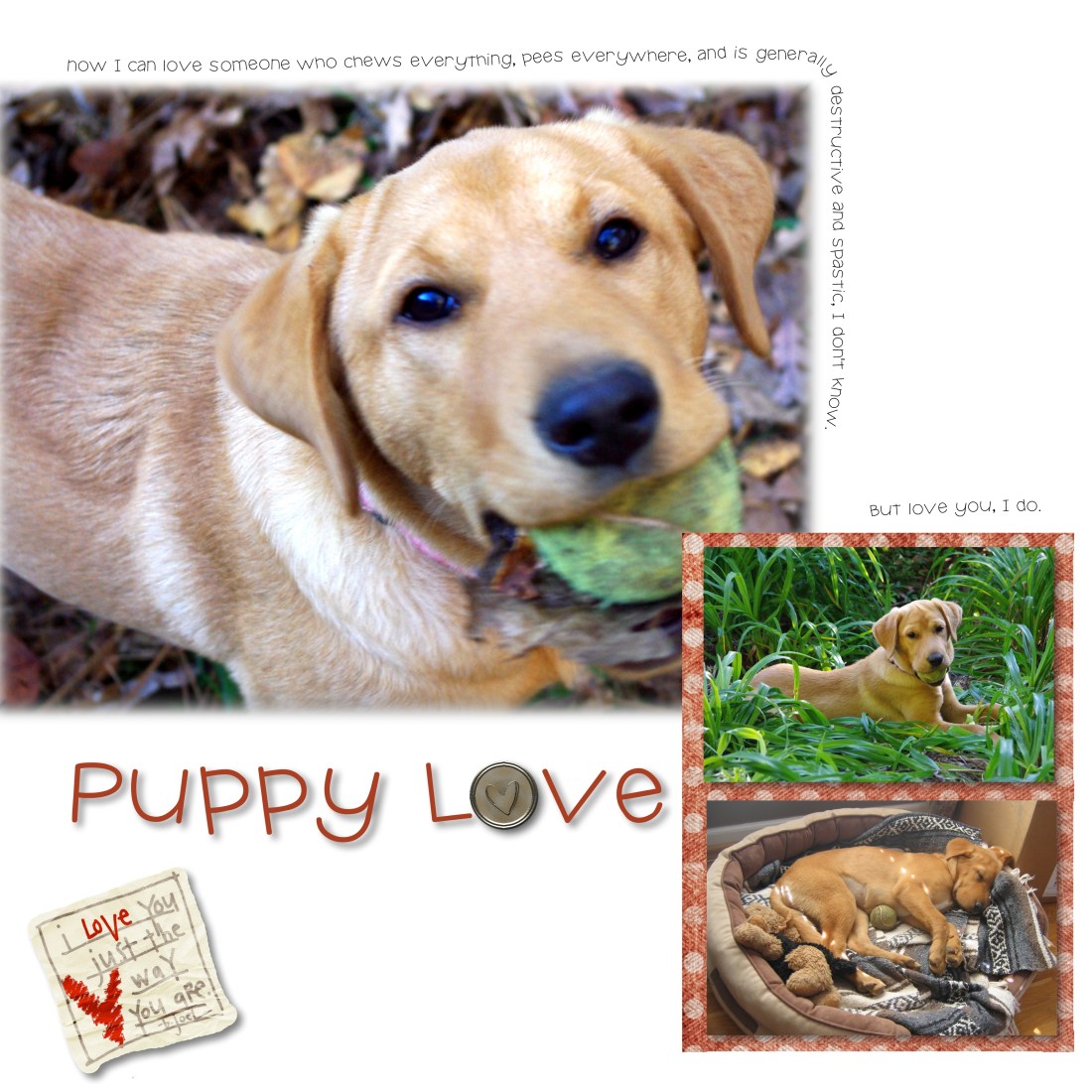
PuppyLove - Page 019You will notice I took some creative license with my design.  I didn’t add the dotted/stitched border.  I added an additional embellishment.  I had planned to put a background in there once I was finished, but then I decided I liked the clean look of the white page, so I left it.

I’ve been thinking about doing a page on Sydney for a while, and have been waiting for the right inspiration to hit.  Well, one look at that layout and I was ready to go.

Inspiration can come from many places.  You can be inspired by a picture, by an advertisement, by colors, fabrics, sunrises, etc.  The trick is to be open to the muse and either act on it right away or write your ideas down so that you can act later.