365 Days of Pictures

In the spring, I started a project I had been contemplating for several months. 

"Project 365" is designed to help you capture the everyday moments in your life. Not just the big events and holidays that we usually scrapbook, but the everday minutiae that makes your life YOUR LIFE.  I think it is a really cool idea. 

I often think back on my childhood and wonder "Did I do that?" when I'm watching my kids play.  How cool it would be to look back at a snapshot of my life at age 7, for example, and see what I was doing then – and even share that with my kids!

The only reason it took me 3 months to get off my duff and do the project was the thought of remembering to take a picture a day (of what, I thought?) and then actually scrapbooking all those pictures. 

I finally bit the bullet in March and started snapping away.  However, I quickly realized that doing this the "traditional" scrapbooking way was going to drive me to drink.  Too much repetition and too much cutting (the template I was using was quite complicated).

So, I decided to make this a digital project.  Sooo much easier. I created the template and now I'm catching up on my album.  It's so much easier. Just drag & drop the pictures into the placeholders and focus on the journaling and decorative aspects of the page. I've decided to keep the pages pretty simple. I want people to focus on the pictures and the stories, not the fancy do-dads. 

Here's a sample:
 365-1

Here's one with a little more decoration:

365-2

I'm chugging along, and actually enjoying the project, now that I am doing it digitally. I'm less overwhelmed by the thought of cutting all those little squares of paper and photos and focusing more on what pictures I want to take to capture the story of a particular day.
And, you don't have to stick to the layout.

For example, the week of Easter, I decided to focus on two things: decorating eggs and Easter morning. So, rather than having a photo for each day of the week, I just concentrated my photos on those two things to represent that week. 

Here's how it turned out:
365-3

It also gave me a chance to easily handle portrait-style pictures without a lot of cropping:
365-4

Think you want to give it a try? Here's the template (In StoryBook Creator Plus 3.0 format) for you to try it out. You will notice I created it in a StoryBook (rather than page print) file.  That way, I can see the two pages side by side (I love that feature) for lining things up and gaining symmetry.  I can always print individual pages if I choose (and I will) to drop into my existing 12×12 album.

Have fun!

Where’s the handbook, please?

Has anyone seen the handbook?

You know the one….

Parenting your Child: Part 2 (The Pre-Teen Years)

I don’t think I got that with my order…

(or any other handbooks for that matter) But I really, really need this one.

You see, I have this wonderful, beautiful, intelligent child.  And about every, oh, day or so, she is invaded by a creature that takes over her consciousness. You know the creature I’m talking about…  The one who thinks parents are so lame and don’t know anything.  The one who thinks little sisters (or brothers) are stupid and a pain.  The one who has the most irrational reactions (good and bad) about the most mundane of things.

When she gets like this I need to find the switch, lever, or button, that will change her back.  Because I’m not quite sure what to do with this other model.  I’m hoping the handbook will show me where the button is, or how to take the batteries out so I can do a reset. (works on my ipod, why not here?)

So, if you happen to have an unused or extra manual lying around, could you loan it to me?  I’m thinking I’ll only need it for the next, oh, eight to ten years… sigh.

Where’s the handbook, please?

Has anyone seen the handbook?
You know the one….

Parenting your Child: Part 2 (The Pre-Teen Years)

I don't think I got that with my order…
(or any other handbooks for that matter)

But I really, really need this one.

You see, I have this wonderful, beautiful, intelligent child.  And about every, oh, day or so, she is invaded by a creature that takes over her consciousness.

You know the creature I'm talking about…  The one who thinks parents are so lame and don't know anything.  The one who thinks little sisters (or brothers) are stupid and a pain.  The one who has the most irrational reactions (good and bad) about the most mundane of things.

When she gets like this I need to find the switch, lever, or button, that will change her back.  Because I'm not quite sure what to do with this other model.  I

'm hoping the handbook will show me where the button is, or how to take the batteries out so I can do a reset. (works on my ipod, why not here?)

So, if you happen to have an unused or extra manual lying around, could you loan it to me? 

I'm thinking I'll only need it for the next, oh, eight to ten years… sigh.

Conspiracy Theories

I am convinced there is a conspiracy.

This conspiracy has been going on for a long time and appears to be recruiting participants as time goes by.

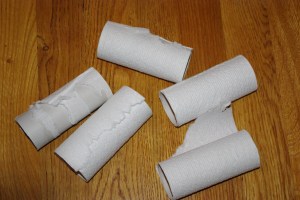
If you are a mom, you may even be affected by this same conspiracy.IMGP1392

It may be somewhat of a delicate subject, but I’ll dive in…

Here’s what I’m talking about:

It seems that 85-90% of the time when I enter a restroom there is no toilet paper.  It happens often enough that I’m beginning to wonder if I have become the universe’s appointed toilet-paper-changer person.  At home, we have three bathrooms.  And four people.  And I promise you, on any given day, whichever bathroom I choose to use will have an empty toilet paper roll sitting there.

Now, it’s not that we haven’t undergone rigorous training around here.  Everyone has been carefully schooled in the fine art of taking the empty roll off (and placing in the wastebasket) and replacing with a clean, fresh roll.  I even make sure we are well-stocked in the lavatory – keeping 3-4 rolls on hand in the event of a major situation in which we need copious amounts of TP.

However, it never fails.  I am greeted with the sad straggler of the abandoned roll; waiting to be decommissioned and reassigned to the recycling.

I’m sure you’ve encountered this before yourself.  Am I right?

I often wonder – do they do this on purpose?  Or is it just lucky coincidence?

I have even left the empty roll on there just to see what others will do.  Usually… nothing.

However, I do recall one time a few years back when my oldest decided to be helpful and “fix” the TP.  IMGP1391Now we have a reinforced holder covering the hole in the wall that was a result of her struggle to remove the roll from the holder. (poor thing was really upset!)  After that incident, I was actually glad she quit wanting to “help” and happily changed out the rolls myself.

It’s not that I mind changing out the rolls.  I don’t.  I just marvel at how quickly they seem to need changing.  And how it always seems to be when it’s my turn in the facilities.  Like there is a cosmic timeline and the timer goes off when I step in the bathroom “bing! time to change the roll!”

I have noticed, too, that I seem to be the lucky one to find the empty rolls in other places, too.

When I am visiting a friend, for example.  And then I’m always struck with the dilemma.  What do I do? Rummage in their powder room for a replacement roll? Leave the empty roll dangling and use tissues? (if there are any)  I usually opt to refill the roll, hoping that my hostess will be more glad I restocked than she is perturbed by my rummaging.

And let’s don’t even get started on the whole “over” or “under” debate…

Conspiracy Theories

I am convinced there is a conspiracy.
This conspiracy has been going on for a long time and appears to be recruiting participants as time goes by.
If you are a mom, you may even be affected by this same conspiracy.

IMGP1392

It may be somewhat of a delicate subject, but I'll dive in…

Here's what I'm talking about:
It seems that 85-90% of the time when I enter a restroom there is no toilet paper.  It happens often enough that I'm beginning to wonder if I have become the universe's appointed toilet-paper-changer person. 

At home, we have three bathrooms.  And four people. 

And I promise you, on any given day, whichever bathroom I choose to use will have an empty toilet paper roll sitting there.
Now, it's not that we haven't undergone rigorous training around here. 

Everyone has been carefully schooled in the fine art of taking the empty roll off (and placing in the wastebasket) and replacing with a clean, fresh roll.  I even make sure we are well-stocked in the lavatory – keeping 3-4 rolls on hand in the event of a major situation in which we need copious amounts of TP.

However, it never fails.  I am greeted with the sad straggler of the abandoned roll; waiting to be decommissioned and reassigned to the recycling.
I'm sure you've encountered this before yourself.  Am I right?

I often wonder – do they do this on purpose? 

Or is it just lucky coincidence?

I have even left the empty roll on there just to see what others will do.  Usually… nothing.
However, I do recall one time a few years back when my oldest decided to be helpful and "fix" the TP. 

Now we have a reinforced holder covering the hole in the wall that was a result of her struggle to remove the roll from the holder. (poor thing was really upset!) 

IMGP1391

After that incident, I was actually glad she quit wanting to "help" and happily changed out the rolls myself.

It's not that I mind changing out the rolls.  I don't.  I just marvel at how quickly they seem to need changing.  And how it always seems to be when it's my turn in the facilities.  Like there is a cosmic timeline and the timer goes off when I step in the bathroom "bing! time to change the roll!"

I have noticed, too, that I seem to be the lucky one to find the empty rolls in other places, too.
When I am visiting a friend, for example.  And then I'm always struck with the dilemma.  What do I do? Rummage in their powder room for a replacement roll? Leave the empty roll dangling and use tissues? (if there are any)  I usually opt to refill the roll, hoping that my hostess will be more glad I restocked than she is perturbed by my rummaging.

And let's don't even get started on the whole "over" or "under" debate…

“Power Layouts” (part two)

Yesterday, we talked about using StoryBook Creator Plus to scrapbook using the “Power Layout” method.  We started out organizing our photos and deciding which photos went on which pages.  If you missed yesterday’s post, you can read it here.

Now, let’s pick up where we left off…We’ve got our pictures placed on the pages and we’re ready to move ahead:

4. Go back and pick paper and embellishments for each page. Now that you have your pictures, you can browse through your content and pick the papers and embellishments you want to use for each page. I have found that when doing digital scrapbooking this is easier if you do the paper and embellishments all at the same time (especially in SBC+) because it is easy to click back and forth between the paper you have selected and the coordinating embellishments.

Again, like we did with the pictures, just drag and drop them on the page. Don’t get hung up with placing things here and there or cutting/cropping anything. That comes next.  For right now, focus on picking what color scheme you want, what papers fit the pictures, etc.

Think about what papers/colors will help you tell the story… what will help bring the photos to life?

5. NOW it’s time to do your digi-scrapbooking… make your page using the paper, pictures, and embellishments you have chosen.  This is the time to let your creative juices flow… make use of the cool features SBC+ has and recolor elements, add textures, layer things up.  Crop your pictures.  Design your page. And, while you are doing this, consider finding a cool layout in a scrapbook magazine (or one you have done in another scrapbook) and re-create it on your page.

6. Don’t forget to save (OFTEN!) I am almost afraid to write this… but I want to warn you…. Save frequently. I have been the unfortunate victim of a cantankerous computer and lost many hours’ worth of work before – on so many different things – books, courseware, scrapbook pages, you name it.  I am almost obsessive about saving.  But, the nice thing about saving frequently is that if you do have a crash, you have less work to recover!

7. Tell the story. Write about the event. You can do bullet-style journaling, capturing the who, what, where, when.  Or, you can go deeper and capture your own feelings and thoughts about what the photos represent.  But, take a few minutes and write something down.

The old adage of “a picture speaks a thousand words” may be true for some people, but I’ve found myself wishing I’d asked my grandmother more questions about the photo albums of hers that I am now the keeper of.  I have pictures of her as a young girl, posing next to other young people and I have no idea who they are…. family? friends? And the thing that makes me the most sad is that the story is lost for good.

I may not always tell every story, but I try to capture the basic essence. I want to be sure that when my grandkids are looking at these scrapbook pages waaaay in the future, they will at least have some idea of who was there and what was going on.

8. Walk away. This may sound a bit strange, but when you think you are finished with your page, save it and walk away.  Then, reopen the file a few days later. You may see something you missed before, or have a different perspective than you did the day you started the page.  I find that as my moods shift, so does my perspective on my scrapbook pages.  So, walking away and coming back often results in some minor modifications to my pages.

However, the trap you have to avoid is never finishing the page.  Which leads me to the final step…

9. Order your page prints! Don’t let the finished pages (or StoryBook) wither away on your laptop!  It only takes a few minutes to upload those pages to an online print service and have them printed.  Creative Memories has an awesome service (which I use and love) but there are a lot of others out there as well – Shutterfly, Snapfish, etc.

The key point here is to get the finished pages off of the computer and into your albums!!

Well, that’s it for now.

Next topic: Organizing your digital pictures in MemoryManager (or on your hard drive)

“Power Layouts” (part two)

Yesterday, we talked about using StoryBook Creator Plus to scrapbook using the "Power Layout" method.  We started out organizing our photos and deciding which photos went on which pages. 

If you missed yesterday's post, you can read it here.

Now, let's pick up where we left off…We've got our pictures placed on the pages and we're ready to move ahead:

4. Go back and pick paper and embellishments for each page. Now that you have your pictures, you can browse through your content and pick the papers and embellishments you want to use for each page. I have found that when doing digital scrapbooking this is easier if you do the paper and embellishments all at the same time (especially in SBC+) because it is easy to click back and forth between the paper you have selected and the coordinating embellishments.

Again, like we did with the pictures, just drag and drop them on the page. Don't get hung up with placing things here and there or cutting/cropping anything. That comes next.  For right now, focus on picking what color scheme you want, what papers fit the pictures, etc.
Think about what papers/colors will help you tell the story… what will help bring the photos to life?

5. NOW it's time to do your digi-scrapbooking… make your page using the paper, pictures, and embellishments you have chosen.  This is the time to let your creative juices flow… make use of the cool features SBC+ has and recolor elements, add textures, layer things up.  Crop your pictures.  Design your page. And, while you are doing this, consider finding a cool layout in a scrapbook magazine (or one you have done in another scrapbook) and re-create it on your page.

6. Don't forget to save (OFTEN!) I am almost afraid to write this… but I want to warn you…. Save frequently. I have been the unfortunate victim of a cantankerous computer and lost many hours' worth of work before – on so many different things – books, courseware, scrapbook pages, you name it.  I am almost obsessive about saving.  But, the nice thing about saving frequently is that if you do have a crash, you have less work to recover!

7. Tell the story. every story, but I try to capture the basic essence. I want to be sure that when my grandkids are looking at these scrapbook pages waaaay in the future, they will at least have some idea of who was there and what was going on.

8. Walk away. This may sound a bit strange, but when you think you are finished with your page, save it and walk away.  Then, reopen the file a few days later. You may see something you missed before, or have a different perspective than you did the day you started the page.  I find that as my moods shift, so does my perspective on my scrapbook pages. 

So, walking away and coming back often results in some minor modifications to my pages.
However, the trap you have to avoid is never finishing the page.  Which leads me to the final step…

9. Order your page prints! Don't let the finished pages (or StoryBook) wither away on your laptop!  It only takes a few minutes to upload those pages to an online print service and have them printed.  Creative Memories has an awesome service (which I use and love) but there are a lot of others out there as well – Shutterfly, Snapfish, etc. The key point here is to get the finished pages off of the computer and into your albums!!
Well, that's it for now. Next topic: Organizing your digital pictures in MemoryManager (or on your hard drive)

Write about the event. You can do bullet-style journaling, capturing the who, what, where, when.  Or, you can go deeper and capture your own feelings and thoughts about what the photos represent.  But, take a few minutes and write something down.

The old adage of "a picture speaks a thousand words" may be true for some people, but I've found myself wishing I'd asked my grandmother more questions about the photo albums of hers that I am now the keeper of.  I have pictures of her as a young girl, posing next to other young people and I have no idea who they are…. family? friends? And the thing that makes me the most sad is that the story is lost for good.
I may not always tell


Happy Tickets

I just love the ideas and things that Stacy Julian finds… and not just the scrapbooking-related ones!

This is a parenting one and I love, love, love it.  Happy Tickets!
A simple, no-nonsense, just-in-time way to reward your kids for doing the right thing. Awesome.

Follow this link to her blog page and learn about Happy Tickets.  I’m downloading mine now.  I bet you will, too.

Posted via email from Thoughts Along Life’s Highway